 March 31, 20267 min read
If you've ever taken charge of an office collection, you'll know the drill. Everyone wants to chip in. Nobody can agree on what to get. You end up going with whatever gets the most nods in the group chat and hoping for the best.
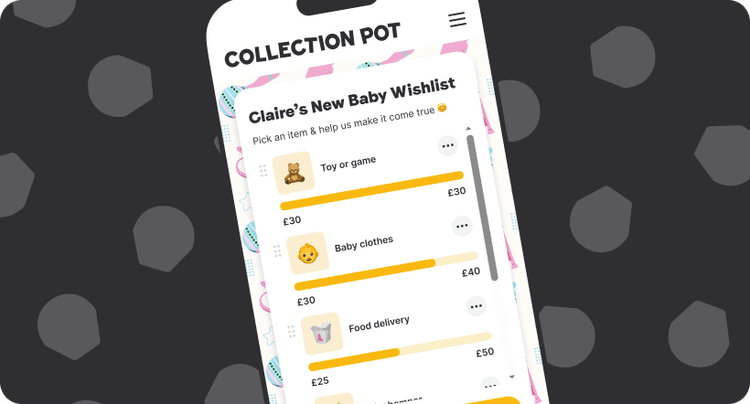
Wishlist changes that. It's a new feature inside Collection Pot that makes group gifting for colleagues a whole lot easier. Add a few gift ideas before you share the link. Your colleagues choose the one that feels right and chip in towards it together. No duplicate gifts. No unwanted surprises. A gift the whole team got behind.
It's just launched for New Baby Pots. New to Wishlist? Catch up here.
Here's how to set one up.
Step 1: Switch on Wishlist in your Pot
Create a New Baby Pot and your Wishlist will be switched on and ready to go. Want to turn it off? You can do that any time in your Pot settings.
Already have a Pot running? You can switch it on mid-collection in your Pot settings. Your colleagues will see the Wishlist ideas next time they visit the link.
Why this helps you
Step 2: Add your gift ideas
This is where Wishlist earns its place.
Add two or three gift ideas to the Pot before you share the link. You're not committing to anything — you're just giving everyone a direction. We'll suggest a few ideas to get you started, or you can swap them out entirely.
For a new baby, think about the whole picture. There's the new arrival, of course, but there's also a new mum who deserves a little love too. The best office collections cover both.
New baby ideas that go down well
Why this helps you
Step 3: Choose how each item gets funded
For each Wishlist idea, you can decide how contributions work.
You can mix and match. One smaller gift that one person can cover outright, plus a bigger item the whole team chips towards.
Why this helps you
Step 4: Share the link and let your colleagues choose
Share your Pot link in the team chat, by email, or wherever works. Your colleagues open the link, see the Wishlist ideas, and pick the one that feels most meaningful to them.
They choose their item. They add a personal message. They chip in and watch the progress bar fill up as the team gets behind it. A personalised thank you note from you lands straight after.
You'll get a progress email each time someone chips in, so you can keep an eye on things without having to chase anyone.
Why your colleagues love it
Step 5: When the Pot closes
Once the Pot closes, you've got a couple of ways to play it.
Withdraw some or all of the cash to buy something yourself — the Wishlist has already pointed you in the right direction, so you're just doing the shopping. Or, if you'd rather the recipient get to choose, send the balance on as a digital gift card redeemable across 100+ retailers.
Can't decide? You can do both. Put some towards something you had in mind and send the rest on so they get a little choice too. It's a nice way to make the gift feel personal and flexible at the same time.
Either way: no awkward chases, no guesswork, no gift that misses the mark.
Frequently asked questions
How do I organise a group gift for a colleague?
Create a Collection Pot, toggle on Wishlist, add a few gift ideas, and share the link with your team. Your colleagues chip in towards the item that feels right. No chasing, no debating, no guesswork. See how it works →
Do my colleagues have to create an account to chip in?
No. They just open the link, choose their Wishlist item, and chip in. No account needed.
Can I add Wishlist to a Pot that's already running?
Yes. Head to your Pot settings and toggle on Wishlist at any point during the collection. Your colleagues will see the ideas next time they visit the link.
Do I have to use the gift ideas Collection Pot suggests?
Not at all. We give you a few ideas to get started, but you can swap them out or add your own. Whatever feels right for the person you're collecting for.
What if I change my mind about what to buy?
No problem. You're not locked into the Wishlist items. When the Pot closes you can withdraw the cash and spend it however you like, or send it on as a gift card.
How much should colleagues chip in?
There's no set amount, but as a rough guide most office new baby collections sit around around £10–£15. Everyone contributes what they can, and it all adds up to something really generous.
Can more than one person chip in towards the same Wishlist item?
Yes. You can set each item so multiple people chip in together and watch the progress bar fill up, or set it so one person funds it outright. It's up to you.
Is Collection Pot free to use?
Creating a Pot and adding a message is always free. There's a small fee of 1.9% + 20p when colleagues chip in, but they can choose to cover this themselves when they contribute, so 100% of the gift goes into the Pot. If they love the experience, they can also leave an optional tip to help keep Collection Pot running. See full pricing details.
One little Pot. One helpful link. Job done.

Jasmine Stone is a marketing manager with nearly ten years’ experience in digital fundraising and tech, creating campaigns that feel human rather than transactional. At Collection Pot, she focuses on content that makes group gifting easier and more joyful. When she is off duty, you will usually find her with her nose in a good book or exploring a new city.